
A complete career record
Keep the work, results, skills, feedback, goals, and evidence that do not fit on a resume.
Keep every accomplishment, project, skill, responsibility, and result in one organized career record. When an opportunity appears, use a supported AI tool to turn the most relevant experience into a tailored resume, cover letter, and interview stories.
One-time purchase · No 8bit subscription · Files stored on your computer
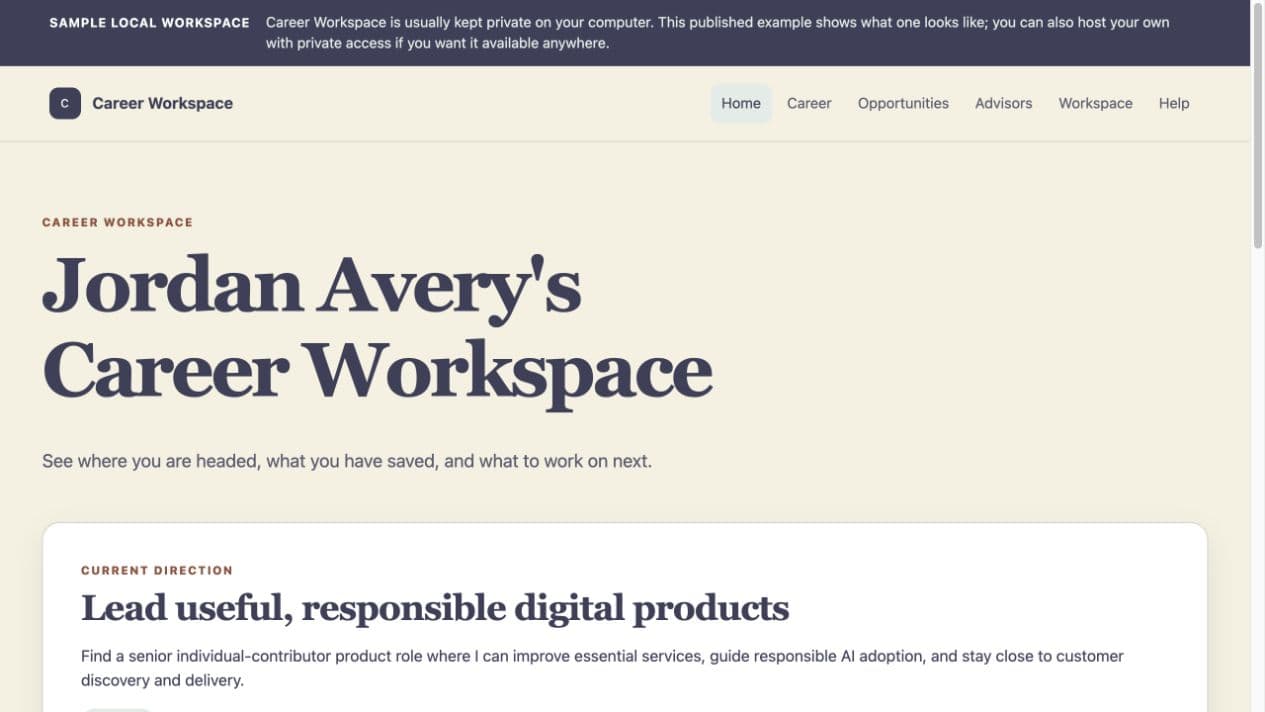
The local Career website lets you review the record your AI tool works from.
The product, plainly explained
Career is a Premium Workspace that works with your AI. Download it to your computer, review it through its private website, and update the files you control by chatting in plain language with a supported AI desktop tool.
Keep the work, results, skills, feedback, goals, and evidence that do not fit on a resume.
Review your information through a website that opens from files on your computer.
Tell the supported AI desktop tool what changed instead of manually editing a database.
Purchase Career once and keep the files, subject to the current license terms.
The AI tool and any AI account or subscription are separate from Career.
2½-minute quick tour
Watch how the local workspace keeps the details behind your work and helps turn relevant experience into focused career materials.
One update, reused later
The quick note
“I just led our warehouse software migration. We launched two weeks early and reduced manual entry by about 30%.”
The organized result
Career keeps the role, project, ownership, timing, result, related skills, and any supporting evidence together. Later, the AI tool can compare those facts with an opportunity without asking you to recreate the story from memory.
Capture
01Add the result in ordinary language while the details are still fresh. You do not need to write a resume bullet.
Organize
02Career connects the accomplishment to the relevant role, project, result, skills, responsibilities, and supporting information.
Match
03When you save a job posting, Career helps identify which parts of your verified experience are most relevant and which gaps still need an honest explanation.
Create
04Use the strongest relevant examples to prepare a tailored resume, cover letter, and interview stories that you review before using.
This is an explanatory example, not a literal product screenshot. Career works only from information you provide and review; it does not independently verify achievements.
A resume is a short summary. Career keeps the deeper record behind it so you do not have to rebuild your history every time an opportunity appears.
The source record
The useful outputs
More context, less rebuilding
A resume contains only a small part of your career. Career keeps the structured record behind the resume so your AI tool has more accurate, reusable context to work from.
A one-off chat
An ongoing workspace
Career does not replace the AI provider. It supplies the organized files, context, and repeatable workflow that the supported AI tool works with.
Requirements before purchase
Career is intentionally computer-based because the AI tool needs access to the complete local folder, not only the short context available in a general browser chat.
Read compatibility detailsOne workspace that grows with you
Purchase the Career workspace once and keep using it as your career changes. A supported AI tool and any related provider account are separate.
Before you decide
Career is a Premium Workspace that works with your AI. It keeps the fuller record behind your resume, stays on your computer, and includes a private website for reviewing your information.
Career is a downloadable desktop workspace delivered as a folder. Inside is a private website you open in your browser and the organized source files your supported AI tool reads and updates. It is not a public online account and is not designed for phone use.
Career is designed to be set up and used on a computer. After purchase, use the account tied to your checkout email to access the download from your computer.
Use a macOS or Windows computer and an AI desktop tool that can read and update the Career folder. You do not need a Terminal, package manager, local server, or database. A standard browser-only AI chat may not have the folder access Career needs.
The supported starting points documented for this local-workspace system are OpenAI Codex in the ChatGPT desktop app and Claude Code in Claude Desktop. Provider features can depend on your operating system, account, and plan.
No. Career is the workspace and its included files. Your AI provider account, plan, service, and any related charges are separate from your Career purchase.
No. Career can guide you through building a first record from what you remember. Mark uncertain details as questions and verify them before using them in an application.
Yes. Those materials can speed up your first setup. Career treats them as source material to review, preserves conflicts as questions, and does not independently verify your employment or achievements.
Career can prepare tailored resume and cover-letter drafts, opportunity-fit reviews, and interview preparation from the information in your record. Resumes and cover letters can be viewed, printed, and downloaded as editable RTF files. Review every draft before using it.
Your Career source files, local website, saved job descriptions, and generated materials live in the Career folder on your computer or in a storage location you control.
It may. Anything you share with an AI tool may be processed by that provider and is governed by its terms, privacy policy, and account settings. Career does not automatically send your folder to 8bit Company.
Keep a copy of the complete Career folder in a storage location you control. You can also ask Career to create a recoverable backup before broad changes. To move it, copy the entire folder so its source files, website, and generated materials stay together.
Yes. Log in to the 8bit account tied to your purchase and open Product Access to download Career again. Your personal updates live only in your own working copy and backups, not in a fresh download.
Email info@8bitcompany.com for help downloading Career, connecting a supported AI tool, or beginning setup. Paid Career consultation is also available for focused help with setup or career materials.
Ready when life changes
Build a career record that grows with you, then use the strongest parts when an opportunity, promotion, or new direction appears.
One-time purchase · Desktop workspace · Separate AI tool required
Workspace Wizard + Website Hosting
Use the Workspace Wizard to plan a custom workspace, focused tool, or complete website for your AI Agent to build. When it is ready, publish the site with 8bit Website Hosting, keep it private, or make it public and share it with anyone.