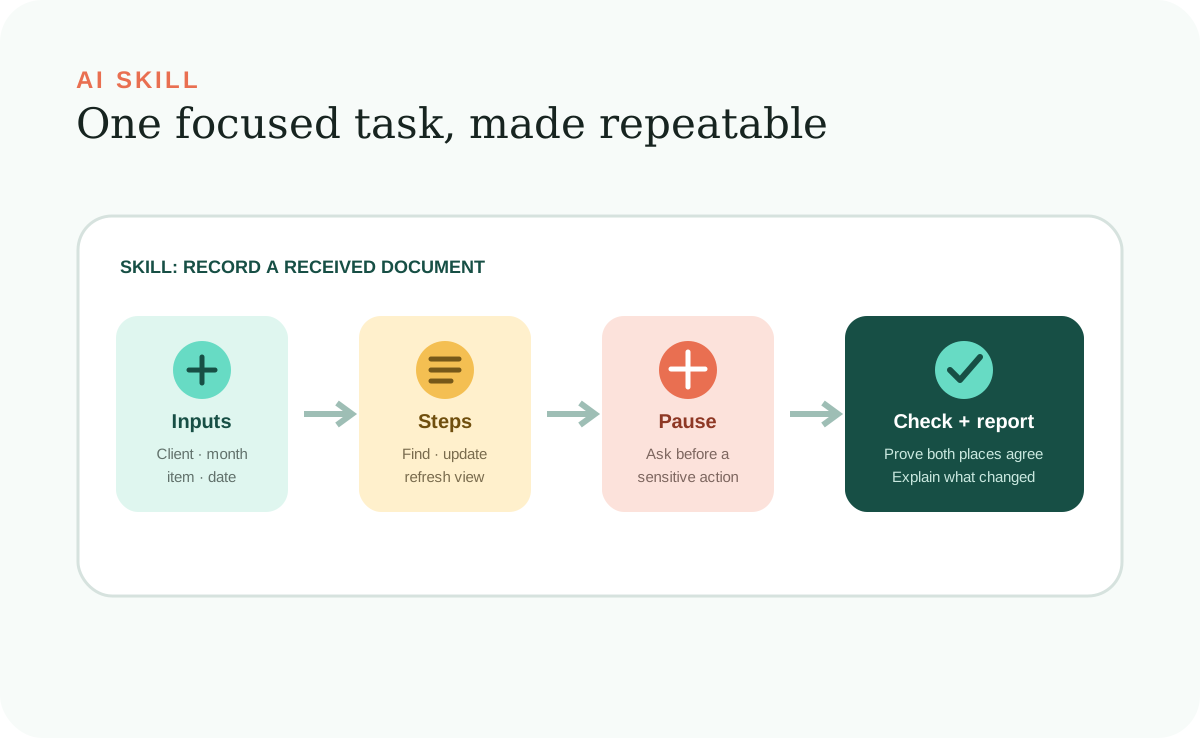
In the Build Your Own guide, a Skill means a reusable procedure that teaches an AI Agent how to complete one focused kind of task. It describes when the task applies, what information is required, which steps to follow, where to pause, how to check the result, and what to report.
Some AI products also use “skill” for a formally packaged capability that the agent can discover automatically. The practical idea is the same—preserve repeatable know-how—but the required file structure and metadata depend on the product.
One kind of job
A Skill should be narrow enough to test.
“Manage client documents” is too broad. It hides several different jobs and decisions. “Record a received document” is focused: you can name the needed details, follow a short sequence, check the saved status, and know when the task is finished.
Narrow Skills are easier to trust because a person can read the complete procedure. They are also easier to improve. If the received-date rule changes, you update one Skill instead of searching through many prompts or rewriting a large catch-all instruction.
The six useful parts
A complete Skill guides the task from trigger to report.
A procedure written for people can use ordinary Markdown with clear headings and direct sentences. A native, automatically discovered Skill must also follow the AI product's packaging requirements. In both cases, the content should answer the questions the agent will face at the moment of work.
When to use it
Name the request or situation that activates this procedure.
What it needs
List the required information, access, and human decisions. Tell the AI Agent to ask for anything essential that is missing.
What it does
Put the actions in order and name the dependable files or records involved.
Pause, check, and report
Identify approval stops, define how success is verified, and require a useful summary afterward.
Native discovery
Automatic discovery requires the packaging your AI product expects.
OpenAI Codex and Claude Code both support Skills stored in a folder with a SKILL.md file. Their current documentation calls for YAML frontmatter that includes at least a name and description, with the rest of the instructions in Markdown. Folder locations and optional supporting files vary by product.
If you only save a procedure under an arbitrary filename, an agent can still use it when your project instructions point to it or you ask the agent to open it. Do not assume the product will discover and invoke it automatically until you have followed that product's specification and tested the trigger.
Guardrails inside the task
A Skill should say what not to assume.
Repeatable work often fails at the exceptions. A name may match two clients. A date may be missing. Updating one record could accidentally change another. The Skill should make these risks visible and tell the AI Agent when to stop.
A safe Skill tells the agent to protect nearby information, ask about important unknowns, and seek approval before consequential actions. It also states what stays unchanged so a narrow request does not expand into a broad cleanup. Use actual permission and approval controls when an action must be technically blocked.
Build from real work
Capture one example before writing a general procedure.
Take a recently completed task and walk through what started it, which information you needed, which decisions you made, what you changed, and how you knew it was correct. Real examples reveal details that a generic checklist misses.
Then test the Skill with a different client, month, or project. Try a normal case, an incomplete case, and a problem case. If the AI Agent has to guess, add a question or boundary. If the Skill becomes unwieldy, split it into two focused jobs.
Skill versus prompt
A prompt asks for today's result; a Skill preserves the procedure.
You might prompt, “Record Cedar Works' payroll report as received today.” The Skill supplies the durable method: required fields, file locations, protected actions, checks, and report. The prompt can stay short because the workspace already knows how this kind of job should be done.
When the procedure changes, update the saved Skill. Future requests then use the improved method without relying on everyone to remember a better prompt.
Further reading
Sources and further reading
- OpenAIBuild skills
- AnthropicExtend Claude with skills