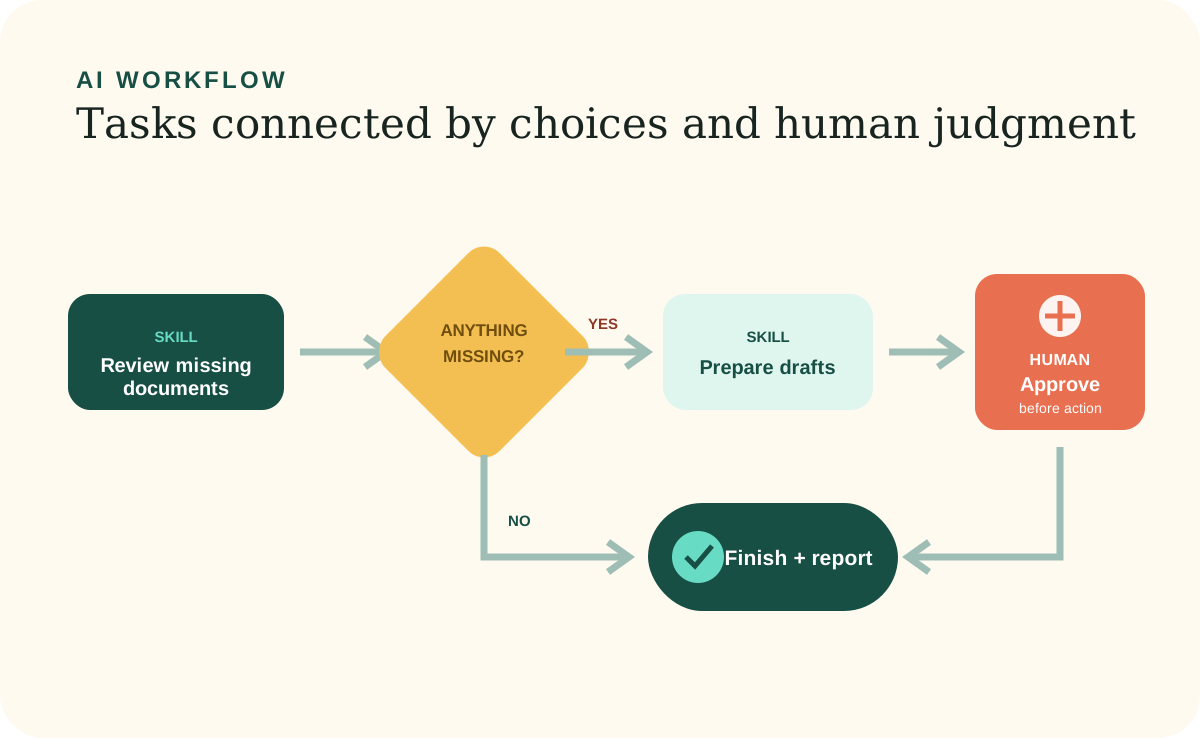
In the Build Your Own guide, a Workflow is a plain-language map of a complete piece of work. This is an 8bit Company organizing concept, not a claim that every AI product has the same native Workflow feature. It connects focused Skills in the right order, handles choices, shows where a person must approve the next action, and defines what a successful finish looks like.
If a Skill is one job, a Workflow is the journey. The distinction helps a nontechnical owner see both the reusable building blocks and the real-world sequence that turns them into an outcome.
From task to journey
A Workflow answers “what happens next?”
A bookkeeper can use one Skill to review missing documents and another to prepare follow-up messages. The month-end Workflow decides when to call each Skill, what to do if nothing is missing, and where to stop so the bookkeeper can review every message before anything is sent.
Without the Workflow, the individual tasks may be correct but disconnected. People still have to remember the order, the handoffs, and the exception paths. Saving the journey makes the whole process easier to repeat and easier to inspect.
The parts of a Workflow
Define the start, readiness, sequence, choices, pauses, and finish.
A useful Workflow lets someone understand the full route without reading every Skill first. It names the stages and points to the focused procedure used at each stage.
When it begins
The event, request, or schedule that starts this complete journey.
What must be ready
The required records, access, decisions, or prior work needed before the sequence starts.
Skills and choices
The focused tasks in order, including what happens when information is missing or a condition changes the route.
Pauses and finish
The human approval points, final checks, saved output, updated views, and completion report.
Human judgment
An approval stop needs a real boundary behind it.
A Workflow should tell the agent to require current approval before sending messages, publishing, deleting records, spending money, or sharing information. For a real enforcement boundary, pair that instruction with the AI product's permission, sandbox, or policy controls. The agent proposes the action and explains it, then waits; approval of an earlier step does not silently approve every later consequence.
Other decisions may depend on judgment rather than permission. If a customer exception has no saved rule, the Workflow should surface the choice instead of inventing a policy. Once the owner decides, that decision can become Workspace Information or a lasting instruction when appropriate.
Make progress visible
People should be able to see the current stage and what is waiting.
A useful Local Site can show that a Workflow is reviewing records, waiting for approval, or complete. This is more informative than a vague “in progress” label. It also helps someone resume the work without asking the AI Agent to reconstruct what happened.
Work summaries can record which Skills were used, which route the Workflow took, what changed, and how the result was checked. They are a readable activity record, not a substitute for the current Workspace Information.
Improve with use
Test the normal route, the empty route, and the problem route.
Run the Workflow with a realistic example. Then test what happens when no work is needed, required information is missing, a person says no at an approval stop, or one Skill fails. The Workflow should preserve what is already correct and explain the next safe step.
Change the saved Workflow when the real process changes. Avoid building branches for every imagined possibility before the first version is useful. Start with the journey you already repeat, then add clarity where real use exposes it.
Further reading