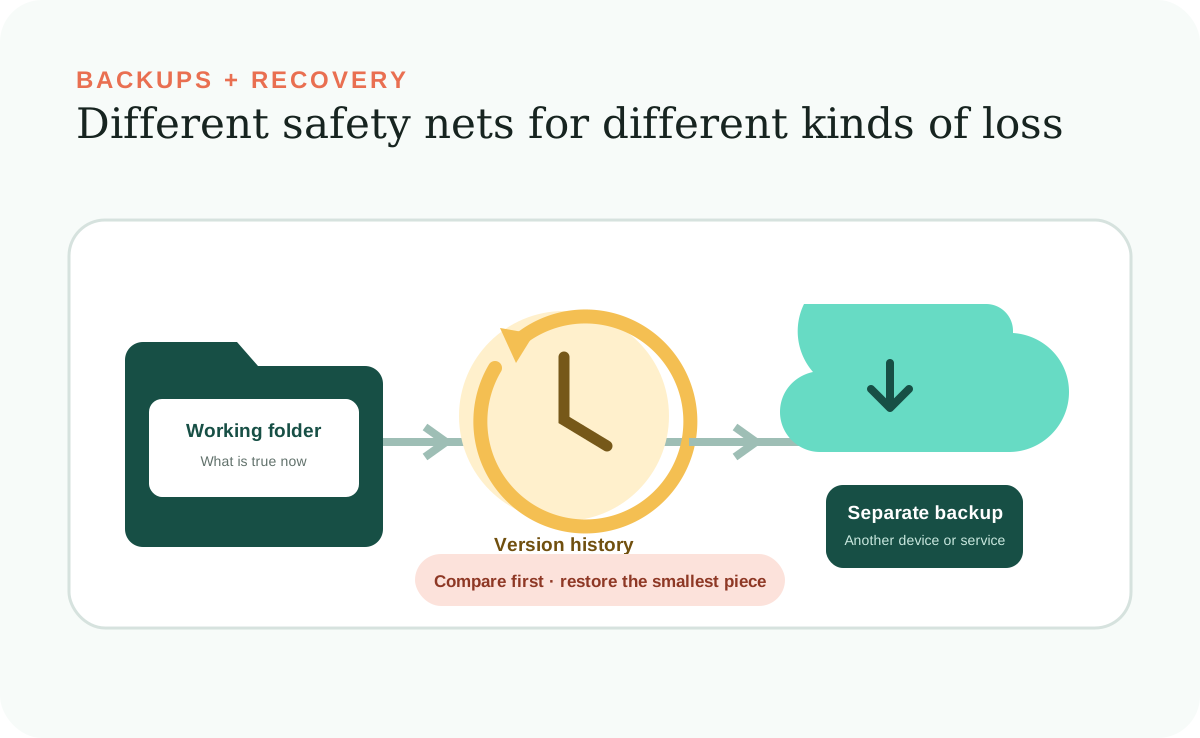
A backup, version history, and work history all help you recover or understand a Desktop Workspace, but they solve different problems. Treating them as the same thing can leave you unprotected when a file is overwritten, a laptop fails, or nobody remembers why a record changed.
A practical setup uses several layers: an immediate copy before risky work, version history, a separate backup of the whole folder, and readable summaries of meaningful changes. The right frequency and retention depend on how much recent work you can afford to lose and how quickly you need to recover it.
Three different questions
Recovery depends on knowing which safety net you need.
Version safety asks, “Can I undo this change?” Disaster safety asks, “Can I recover if this computer and its folder disappear?” Work history asks, “Can I understand what happened and why?” One mechanism rarely answers all three well.
Dated safety copy
A copy made before a risky change helps restore a file or record if the AI Agent's edit is wrong.
Version history
A file-sync or version-control service may keep earlier versions and conflicting edits across time.
Separate backup
A copy on another device or trusted service can restore the whole workspace after loss, theft, drive failure, or local corruption.
Work summary
A readable record names the request, files and instructions used, changes made, and checks completed. It explains activity but does not restore files by itself.
The same-device trap
A copy inside the Local Folder is not disaster protection.
The guide recommends a backups folder for quick recovery before broad changes. That is useful version safety. But if the entire laptop is lost or the drive fails, an internal backups folder disappears with everything else.
Keep another current copy outside the computer. An automatic backup service or an external drive can provide that layer. If you use an external drive, connect it often enough that the backup meets your recovery needs and store it separately—ideally disconnected or otherwise isolated when not in use.
A sync service can be useful, but synchronization is not automatically a complete backup. Deletions, corruption, or unwanted changes may propagate to synced copies, and retention can be limited. Verify that earlier versions are retained long enough and that you can recover them independently.
Restore the smallest piece
Recovery should begin with comparison, not another broad change.
When something looks wrong, stop the AI Agent from continuing. Ask for a read-only comparison between the current files and the latest known-good version. Identify the exact files or records affected and decide what should remain unchanged.
Restore only the wrong item, then confirm that the dependable Workspace Information and every affected Local Site page agree. Small restoration protects newer correct work that may exist alongside the mistake.
Sharing and conflicts
A shared folder needs access control and a plan for simultaneous edits.
When several people or AI sessions can change the same workspace, a sync service may create conflicting copies or one edit may overwrite another. Limit access to the people who need it, keep version history enabled, and avoid broad concurrent changes to the same records.
Work summaries help the team see which files a completed task used and changed. They do not prevent conflicts, but they make a confusing result easier to investigate. For sensitive information, choose a storage service whose access, recovery, and retention controls meet your needs.
Test before you need it
A backup you have never restored is still an assumption.
Periodically restore the workspace into a temporary location and confirm that the expected files exist and the Local Site opens. Check the date of the latest separate backup. Make sure you can retrieve an earlier version without overwriting the current one and document the restore steps another responsible person would need.
The goal is not a complicated enterprise recovery program. It is confidence that one mistaken edit, one failed device, or one confused handoff will not erase the useful system you have built.
Further reading