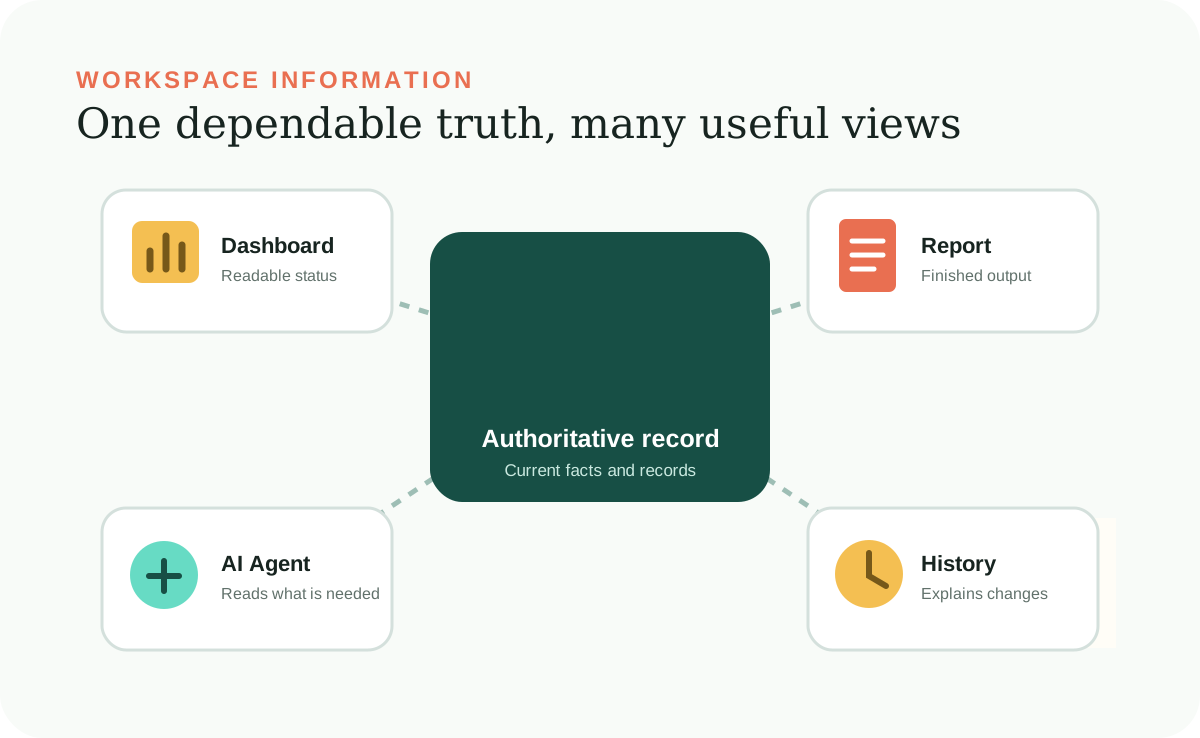
Workspace Information is the dependable set of facts and records a Desktop Workspace uses. It might include client names, document statuses, project decisions, product details, or the date something happened. It is the material the AI Agent works from, not a mysterious memory inside the AI.
For a nontechnical user, the most important idea is simple: useful AI work depends on knowing which record is authoritative. When that record is saved clearly, both you and the AI Agent can inspect it, correct it, and use it again later.
An authoritative record
The dependable record is different from every view of it.
A dashboard can show that four clients are missing documents. A follow-up list can repeat the same names. A work summary can say that one status changed. Those are presentations or records of activity. The underlying status file is still the dependable home for what is true now.
This separation prevents a common problem: correcting one page while an older copy remains somewhere else. The AI Agent should update the saved information first and then refresh every page or report that depends on it.
What counts as information
Save facts, decisions, status, and useful uncertainty.
Workspace Information is broader than a contact list. It can include decisions and their dates, current priorities, the status of open work, confirmed preferences, source references, and known constraints. It should also make uncertainty visible instead of forcing the AI Agent to guess.
Known
A confirmed fact, such as a received date or approved client contact.
Unknown
Information that is genuinely missing and needs a person to supply or verify it.
Suggested
An AI-generated option or draft that has not become an accepted fact.
Historical
Something that used to be true and is kept for context, not mistaken for the current state.
Plain files are enough
Readable text can be structured without becoming technical.
The guide uses Markdown files, which end in .md. Markdown is ordinary text with a few readable markers for headings and lists. You can open it in a basic text editor, and the AI Agent can update it without a specialized database program.
The structure comes from consistent labels and homes, not from complexity. A client record can use the same fields every time. A status list can use the same words for received, missing, and waiting. Consistency makes information easier for people to review and safer for the AI Agent to change.
Corrections that last
Fix the saved information, not only the conversation.
Telling an AI Agent that it misunderstood something can solve the current chat. It does not automatically make the correction available next week. A lasting correction belongs in the Workspace Information if it changes a fact, or in Agent Instructions if it changes how work should be handled.
Ask the AI Agent to show which record it will change, preserve anything that should remain untouched, update the affected Local Site pages, and report how it checked the result. This turns a correction into durable workspace knowledge.
Keep it dependable
Review the information the way you would review an important shared document.
Use clear names, real dates, consistent statuses, and references when the source matters. For consequential facts, record where the information came from, when it was verified, and how confident you are that it is current. Remove obsolete duplicates instead of letting them compete with the authoritative record.
Before a broad change, make a recoverable copy and ask the AI Agent to name what will be affected. Periodically review records whose accuracy can decay, such as prices, policies, contact details, and project status.
Most importantly, keep judgment visible. If a choice still needs a person, record that it is awaiting approval. The AI Agent should help organize uncertainty, not quietly convert it into certainty.