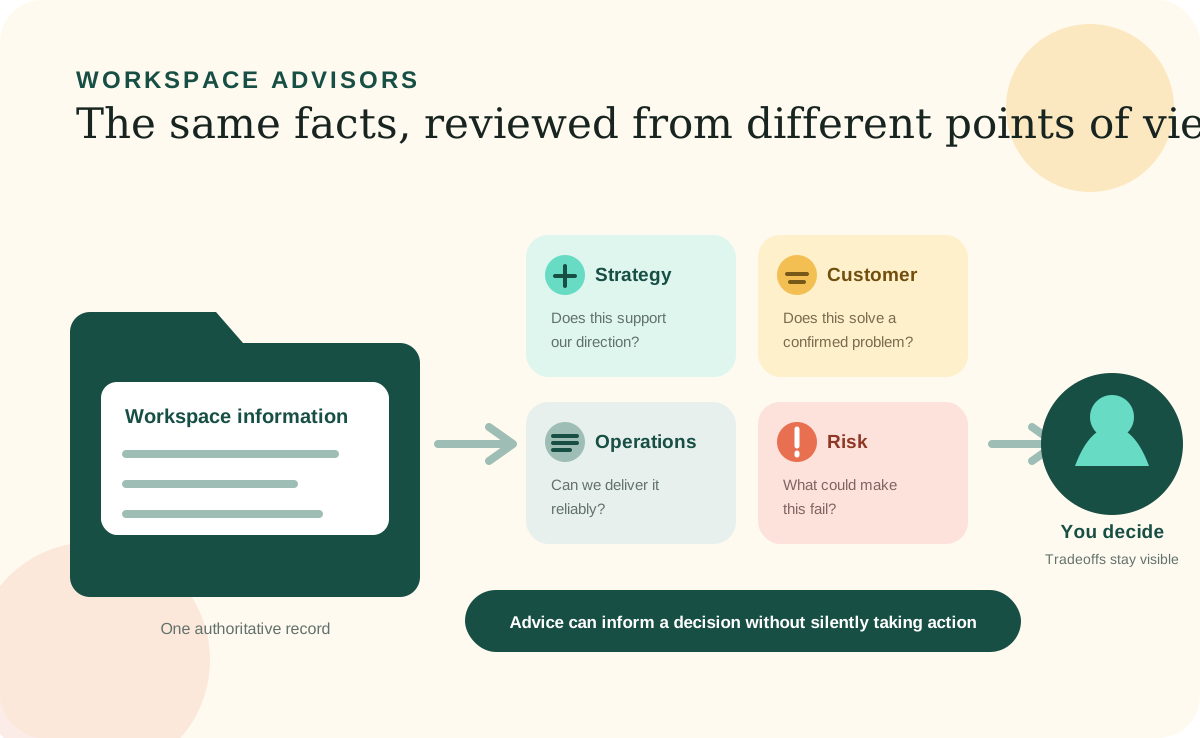
Groundwork and Career include Advisors, although each workspace has a roster shaped for its own purpose and the available behavior can change by product version. Advisors let an 8bit Workspace examine the same question through several focused points of view. A Strategy Advisor can look at direction and tradeoffs, while an Operations Advisor looks at capacity and execution. Both start from the same saved workspace information.
An Advisor is not a separate person, an all-knowing expert, or an autonomous employee. It is a structured AI review role with a clear purpose, a defined way of evaluating a request, and boundaries around what it should and should not claim. That structure makes the advice easier to understand, compare, and improve.
The value of Advisors
One decision can deserve more than one useful question.
Important decisions rarely belong to one department. A new offer might fit the company's strategy but create a delivery problem. A cost-saving change might improve margin while making the customer experience worse. Asking one general AI chat to consider everything can produce a broad answer that hides the real tradeoffs.
Advisors make the perspectives explicit. Each one has a mandate: the area it is responsible for examining. It also has working methods, decision rules, safeguards, and an expected answer format. You can inspect those instructions instead of wondering why the AI emphasized one concern and ignored another.
Ways to use them
Consult one Advisor, ask for the best fit, or compare several.
You do not need to learn special commands. Describe the decision, draft, risk, or open question in normal language. You can name the perspective you want, let the Workspace select the most relevant Advisor, or ask several Advisors to review the same issue.
Ask one focused Advisor
Use a specific perspective when you already know the kind of review you need, such as asking a Risk Advisor to pressure-test a plan or a Hiring Manager Advisor to review a resume.
Ask the Workspace to choose
Explain the situation and ask which Advisor is most relevant when you are unsure where the question belongs.
Request a multi-Advisor review
Compare several perspectives for a decision that affects customers, money, operations, technology, people, or risk at the same time.
Use an Advisor to find better questions
Ask what information is missing, which assumptions need evidence, and what you should learn before deciding.
Useful disagreement
Advisors do not have to agree to be helpful.
A multi-Advisor review should not manufacture a cheerful consensus. If the Strategy perspective supports an idea while the Finance or Risk perspective identifies a serious concern, the disagreement is part of the answer. It shows you which tradeoff needs judgment.
The Workspace can synthesize the perspectives by naming what they agree on, where they differ, what each conclusion is based on, and which unknowns could change the recommendation. You still decide what matters most and what happens next.
Why you can explore safely
Consultation gives advice without silently taking authority.
In an 8bit Workspace, Advisor consultation is designed as a read-only review. An Advisor can review the information it is allowed to use and give a recommendation, but the recommendation does not save itself as a fact or automatically change a record, rewrite a rule, send a message, publish something, make a purchase, or contact anyone.
Saving or acting on the recommendation is a separate request. Consequential actions should also be protected by the AI tool's actual permission and approval controls; written instructions guide behavior but are not a security boundary by themselves. Advisor knowledge stays separate from the Workspace's dependable facts so a repeated opinion does not quietly become company truth.
Your request remains in control
The Advisor's instructions keep the review focused; actual tool permissions should independently restrict unrelated changes and external actions.
Facts outrank opinions
Saved evidence, current records, privacy rules, and known constraints take priority over imported or Advisor knowledge.
Unknowns stay visible
A trustworthy review says what it cannot verify instead of filling gaps with confident-sounding assumptions.
Methods are inspectable
The Local Site can show an Advisor's purpose, methods, decision rules, boundaries, and suggested requests in readable pages.
Updating an Advisor
Teach it how your needs have changed through conversation.
An Advisor should evolve when the work it supports changes. You might sharpen its purpose, add a question it should always ask, teach it a new evaluation method, improve its answer format, or add carefully selected reference material. You can request these changes in plain language through your AI Agent.
For example: “Update the Marketing Advisor so every campaign review checks whether the claim has a real proof point. Show me the proposed change before saving it.” The AI Agent should identify the authoritative Advisor files, check for conflicts or duplication, preserve the source of the new instruction, validate the result, and rebuild the affected Advisor page for review.
A material change to an Advisor's mandate or boundaries deserves confirmation because it can change the kinds of recommendations the Advisor produces. Protected safeguards for truth, privacy, provenance, and authorization are not ordinary preferences and should not be weakened through customization.
Creating a new Advisor
Start with the perspective you need, not an impressive title.
A new Advisor is useful when a recurring decision needs a distinct point of view that your current Advisors do not cover. Career might add an Interview Advisor. A service business might add a Client Experience Advisor. A product team might add an Accessibility Advisor. The role should be focused enough that you can explain what it contributes and where its authority ends.
Ask your AI Agent to inspect the existing Advisor roster before creating anything. This prevents a new Advisor from duplicating a perspective that could be improved instead. Then define the new role in plain language and review its generated page before relying on it.
Purpose and mandate
What the Advisor helps with and the exact area it is authorized to examine.
Methods and decision rules
The questions it asks, evidence it looks for, and principles it uses to form advice.
Boundaries
What it must not assume, claim, decide, or do—and when it should surface uncertainty or recommend qualified professional help.
Answer format and knowledge
How it should present its review, plus any focused references or question bank it needs without mixing them into your saved facts.
Keeping Advisors useful
Better context improves advice, but judgment still belongs to you.
Advisors become more relevant when the Workspace contains current goals, constraints, decisions, evidence, and known unknowns. If the underlying information is incomplete or outdated, the right response may be a list of questions rather than a confident recommendation.
Review an Advisor when its advice becomes generic, repeatedly misses an important concern, relies on stale material, or overlaps another role. Keep what makes the perspective distinct. Remove obsolete guidance. Test it with a realistic decision and confirm that the answer shows its evidence, uncertainty, tradeoffs, and boundaries.
Advisors can help you think with more discipline. They can challenge assumptions, uncover missing information, and bring several legitimate perspectives into one decision. They do not replace your judgment or licensed legal, financial, tax, human-resources, compliance, or other professional advice.