You may need a cookie consent banner, but not every website in the United States is legally required to show one. The answer depends on what your site stores or reads on a visitor's device, what personal information it collects, why that information is used, where your visitors live, and whether a privacy law applies to your organization.
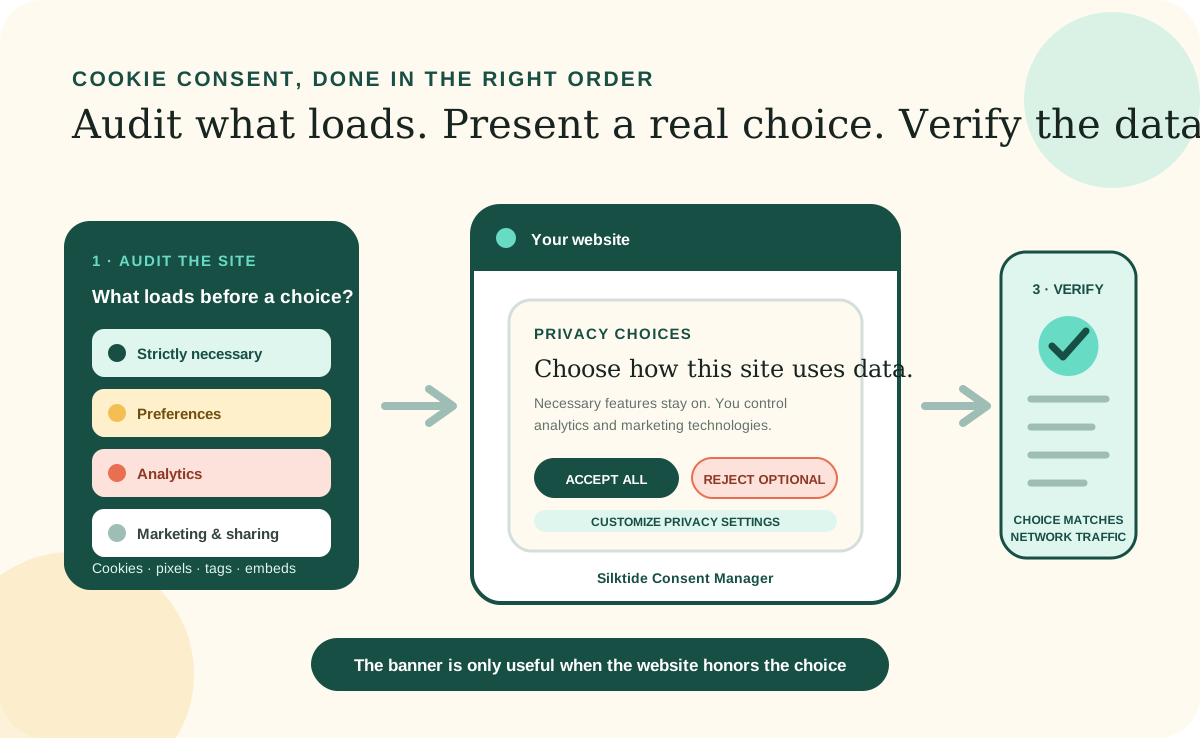
The most useful rule is simple: audit the tracking before choosing the banner. A banner is only the visible control. Compliance depends on whether the site gives the required notice, waits for consent when consent is required, honors opt-out signals, and actually stops the corresponding scripts when a visitor says no. This article is general information, not legal advice; ask a privacy lawyer to review higher-risk or uncertain uses.
The short answer
A cookie banner is a tool, not the legal requirement itself.
Privacy laws generally regulate the collection and use of information, not the presence of a particular rectangle at the bottom of a webpage. A banner may be the clearest way to provide notice and collect a choice, but installing one does not make an otherwise noncompliant site compliant.
The United States still has a patchwork of federal sector-specific laws and state privacy laws rather than one comprehensive federal consumer privacy law. Many state laws use an opt-out model for ordinary personal data, sale, sharing, or targeted advertising. Some situations require affirmative opt-in consent, especially for sensitive data or children's data. By contrast, European rules generally require consent before nonessential cookies are set, even when the website owner is based in the United States.
Inventory the site
Find every cookie, pixel, tag, and embedded service first.
Cookies are only one tracking technology. Analytics scripts, advertising pixels, tag managers, chat widgets, embedded videos, maps, payment tools, and browser storage can also collect identifiers or send information to another company. A cookie-only review can miss the most important data flows.
Open the site in a fresh browser session, inspect storage and network requests before making a choice, and repeat the test after accepting and rejecting each category. Check every page template and important interaction, not just the homepage. Record the provider, data collected, purpose, duration, recipients, and whether the tool is truly necessary for a feature the visitor requested.
Strictly necessary
Security, load balancing, authentication, a shopping cart, or a visitor's saved consent choice may be necessary to deliver a requested service. Necessary does not mean merely useful to the business.
Preferences
Language, region, display, or other convenience settings may remember a visitor's choice but are not always essential to the service.
Analytics
Audience measurement can range from low-data first-party statistics to third-party profiles. Do not assume every analytics configuration has the same legal effect.
Marketing and sharing
Advertising pixels, retargeting, cross-context behavioral advertising, and some third-party integrations can trigger sale, sharing, targeted-advertising, or consent requirements.
When you may need one
Consent, opt-out, and notice duties can make a banner useful or necessary.
A consent banner is usually appropriate when a site serves people in a jurisdiction that requires prior consent for nonessential storage or tracking. European Union guidance says consent is required before nonessential cookies are installed, while strictly necessary cookies are exempt. A U.S. business can therefore need an opt-in banner because of where its visitors are located, not only where the company is located.
In the United States, a banner or preference panel may be one part of a compliant experience when a covered business sells or shares personal information, uses it for targeted advertising, processes sensitive data, or needs to present required notices and choices at the right time. A site directed to children under 13, or one with actual knowledge that it collects their personal information, must also account for the federal Children's Online Privacy Protection Rule. The Federal Trade Commission treats persistent identifiers that recognize a child over time and across sites as personal information, subject to limited exceptions, and covered operators generally need verifiable parental consent before collection.
A banner may also be needed to keep a promise your organization has already made in a privacy policy or contract. The Federal Trade Commission can challenge unfair or deceptive privacy practices. If your policy says analytics runs only after consent, the implementation must match that statement.
When it may not be required
A small, U.S.-only site with essential technology may not need a consent prompt.
A consent banner is often not required for a simple U.S.-only brochure site that does not use analytics, advertising pixels, cross-site tracking, or nonessential browser storage and uses only technology that is necessary for security or a feature the visitor requested. It also may not be required when the organization and its processing are outside every applicable law's coverage and no contract or platform rule requires it.
That is not a universal small-business exemption. State laws use different coverage tests, exemptions, definitions, and duties, and some protect particular data regardless of a company's size. Removing unnecessary tracking is often the simplest solution: if a third-party script provides little value, delete it instead of adding a banner solely to justify it.
Do not confuse “no opt-in banner required” with “no privacy work required.” A covered U.S. business may still need a privacy notice, a conspicuous opt-out link, a way to exercise data rights, data-processing contracts, and support for browser-based opt-out preference signals.
United States rules
Expect opt-out rights, special consent cases, and state-by-state differences.
There is no single U.S. cookie-banner rule to configure once and forget. Federal law addresses particular sectors and practices, while state laws increasingly govern broader uses of personal data. The examples below show the pattern, not a complete list of every state requirement.
Federal consumer protection
The FTC Act reaches unfair or deceptive privacy practices. Describe tracking accurately, collect only what you can protect and justify, and make the site's behavior match its notice and choices.
Children under 13
COPPA can require notice to parents and verifiable parental consent before a covered child-directed service collects personal information, including certain persistent identifiers. A general-purpose cookie banner is not a substitute for a COPPA process.
California
Covered businesses must provide notice at collection and let consumers opt out of sale or sharing, including through qualifying opt-out preference signals such as Global Privacy Control. California also requires a clear and conspicuous “Do Not Sell or Share My Personal Information” link in applicable cases.
Colorado and Connecticut
Covered controllers must provide privacy notices and opt-outs for sale and targeted advertising, honor qualifying universal opt-out signals, and obtain consent for sensitive data. These states illustrate why a banner cannot replace a persistent settings or opt-out path.
Sensitive and health-related data
Precise location, health information, biometric data, and other sensitive categories can trigger stricter state duties. Pixels on health-related pages are especially risky because the page visited can reveal or support an inference about a person's health.
A practical recommendation
Silktide Consent Manager is a strong free starting point.
Silktide Consent Manager is free, open source, and licensed under the MIT License. It supports essential, analytics, marketing, and custom consent categories; can load scripts after consent; integrates with Google Tag Manager; stores a visitor's choice; and provides keyboard and screen-reader features. You can use Silktide's configuration tool, load the files from a content-delivery network, or self-host the JavaScript and CSS in your website.
We recommend it because the implementation is inspectable and the core controls do not require a paid subscription. Self-hosting the versioned files gives your Workspace a stable dependency that an AI agent can review and test. Keep the upstream license and record the version you installed so future maintenance is deliberate.
Silktide is an implementation tool, not a lawyer or automatic compliance guarantee. Do not copy a demonstration configuration without reviewing it. For an opt-in experience, nonessential categories should start off and their scripts should not load until the visitor accepts. Treat Global Privacy Control, your privacy notice, data-rights links, consent records, and any region-specific behavior as separate requirements to verify.
Add it with AI
Ask your coding agent to audit, install, connect, and test the banner.
Open your website's Workspace in a file-capable AI coding agent. Give the agent the approved privacy decision, the visitor regions you support, and the tracking tools you intend to keep. The agent can inspect the existing stack, inventory scripts, add Silktide through the site's established layout, connect each nonessential script to the right choice, add a permanent privacy-settings control, and verify the behavior in a clean browser session.
Ask for an audit before implementation if you have not decided which laws or visitor regions apply. An AI agent can find technical facts and implement an approved policy, but it should not invent your legal basis or silently choose which data uses the business accepts. Have a qualified reviewer confirm uncertain classifications, sensitive-data uses, children's services, or multi-jurisdiction rules.
Inspect without changing files
Inventory cookies, local storage, pixels, tag-manager containers, embeds, and network requests. Map each item to its provider, purpose, duration, data recipients, and current load timing.
Propose the consent model
Separate strictly necessary, preferences, analytics, and marketing. State which visitor regions and legal decisions the proposal assumes, and flag anything that needs human or legal review.
Install Silktide through existing patterns
Prefer the site's shared layout or script service, self-host versioned assets when appropriate, retain the MIT license, match the site's design, and avoid creating a second analytics or script-loading system.
Connect behavior to the choice
Prevent nonessential scripts from loading before the required consent, stop future loads after rejection or withdrawal, provide equally understandable choices, and keep privacy settings available after the banner closes.
Test the real data flow
Verify first visit, accept all, reject nonessential, granular choices, withdrawal, repeat visits, private browsing, keyboard use, mobile layout, failure without local storage, and Global Privacy Control where applicable.
Before publishing
Verify behavior, language, and access—not just appearance.
Use plain labels, make rejection no harder to understand than acceptance, and avoid preselected nonessential categories in an opt-in model. The banner must not obscure essential content, trap keyboard users, or shift the page unexpectedly. Visitors should be able to reopen settings and withdraw consent as easily as they gave it.
Update the privacy or cookie notice so it matches the actual inventory. Name the purposes and providers, explain the available choices, and describe how long information or preferences are retained. Recheck the site after adding marketing, analytics, embeds, or a new tag-manager container; these are the changes most likely to make an accurate banner inaccurate.
Finally, keep evidence of the decision: the inventory date, applicable visitor regions, approved categories, installed Silktide version, test results, and owner of the next review. A short, repeatable review after every tracking change is more dependable than a banner installed once and forgotten.
Further reading
Sources and further reading
- Federal privacy frameworkCongressional Research Service: Preemption and Privacy Law
- Federal children's privacyFederal Trade Commission: Complying with COPPA FAQs
- CaliforniaCalifornia Privacy Protection Agency: CCPA FAQs
- ColoradoColorado Attorney General: Colorado Privacy Act
- ConnecticutConnecticut Attorney General: Connecticut Data Privacy Act
- European visitorsYour Europe: Online privacy and cookies
- Recommended free toolSilktide Consent Manager
- Source code and licenseSilktide Consent Manager on GitHub